The bathroom scale has always told you the least useful number in fitness. Lose two pounds of fat and gain two pounds of muscle, and it reads exactly the same — right when you've made real progress. That's why body scan apps have taken off: point your phone's camera at yourself, and you get an estimate of body fat, lean mass, and measurements that a scale can't see.
But "scan your body" means very different things depending on the app. Some build a 3D model for precise measurements. Some estimate body fat from a couple of photos. And almost all of them stop at the number — leaving you to figure out what it means for your next workout.
Krato is the pick if you want the scan to change your training: it estimates body composition from a photo, flags lagging muscle groups, and shifts extra volume toward them in your plan. Spren is a strong standalone body composition scanner. ZOZOFIT is best for detailed 3D measurements over time, and Bodymapp uses the iPhone's depth sensor for a 3D body model without storing photos.
What a Body Scan App Can (and Can't) Tell You
Body scan apps generally fall into two camps:
- Photo-based estimation. You take one or more photos, and a computer-vision model estimates body fat percentage and related metrics from your shape. It's fast and works on almost any phone.
- 3D scanning. The app combines multiple photos or depth-sensor data into a 3D model of your body, then calculates circumferences (waist, hips, arms) and estimates composition from that model.
Neither replaces a clinical DEXA scan, but the research is more encouraging than you might expect. A 2022 validation study in npj Digital Medicine found that body fat estimated from ordinary smartphone photos landed within about 2.2 percentage points of DEXA on average — closer than the consumer bioimpedance devices it was compared against.
The practical takeaway: treat a single scan as a ballpark, and treat the trend across scans as the real signal. If your estimate drops from 19% to 16% over three months under the same conditions, that change is meaningful even if the absolute number is a point or two off.
Krato
Most body scan apps are measurement tools. Krato is a training app that uses the scan as an input.
You take a front-facing photo, and Krato estimates your body composition and muscle balance — including which muscle groups are lagging behind the rest. Then it does the part the other apps leave to you: it shifts extra training volume toward those areas in your routine. If your side delts and calves are behind, your plan reflects that the next time you train.
Because Krato also handles progressive overload and pairs every exercise with expert form cues, the scan doesn't sit in a separate dashboard. It feeds directly into what you lift, how much, and how you lift it. Re-scan every few weeks and you can see whether the gaps are actually closing.
Krato estimates your body composition from a photo, flags lagging muscle groups, and adjusts your plan to bring them up. Free on the App Store.
Try Krato Free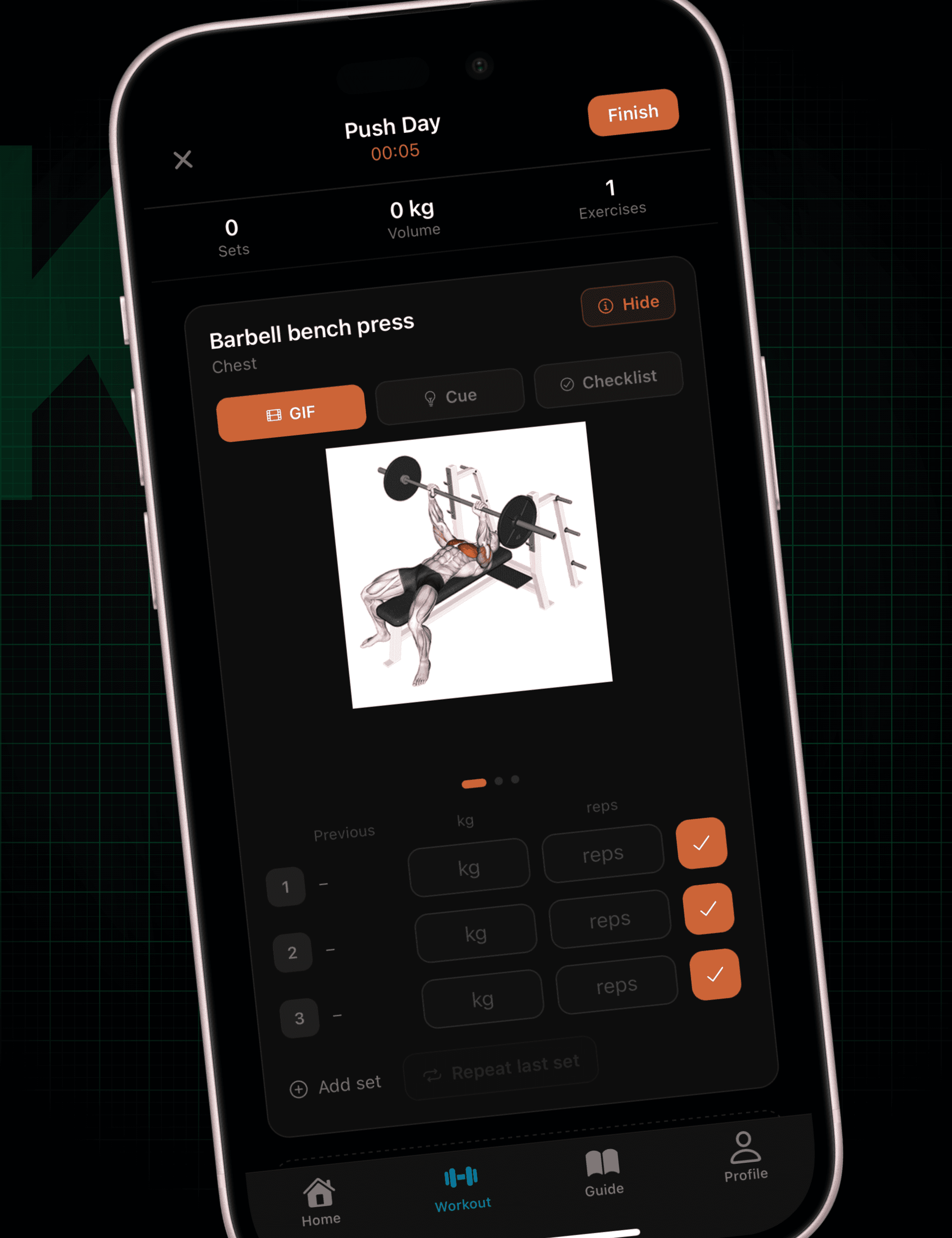
Spren
Spren is a dedicated body composition scanner. You take a front and side photo in form-fitting clothing, and its AI estimates body fat percentage along with fat mass, lean mass, and resting metabolic rate. It's available on both iOS and Android and is one of the more established names in photo-based scanning.
It's a good fit if you want a detailed composition readout and already have a training plan you're happy with — Spren tells you where you stand, and you decide what to do about it.
ZOZOFIT
ZOZOFIT, from the Japanese fashion company ZOZO, started as a way to measure bodies for custom-fit clothing — and that heritage shows. It builds a 3D model from a 360-degree series of photos and tracks measurements across key areas of the body, scan to scan.
You can scan with just your phone's front camera in form-fitting clothes, or use the optional marker-covered ZOZOSUIT for more detailed captures. If your main goal is tracking how your waist, hips, chest, and arms change over time, ZOZOFIT's measurement focus is hard to beat.
Bodymapp
Bodymapp takes a different technical route: instead of analyzing photos, it uses the infrared depth sensor in supported iPhones and iPads — the same kind of hardware behind Face ID — to map your body's contours into a 3D avatar. It reports up to 20 measurements, including waist-to-hip ratio and a body fat estimate.
One notable detail is privacy: Bodymapp says it doesn't capture photographic images during a scan, only depth data. That makes it appealing if the idea of uploading body photos makes you uneasy. The trade-off is device support — you'll need compatible Apple hardware.
Body Scan Apps Compared
| App | How it scans | Best for | Changes your training? |
|---|---|---|---|
| Krato | Front-facing photo | Turning results into a plan | Yes — shifts volume to lagging muscles |
| Spren | Front + side photos | Detailed composition readout | No |
| ZOZOFIT | 360° photos, optional suit | Tracking measurements over time | No |
| Bodymapp | iPhone/iPad depth sensor | 3D model without photos | No |
How to Get Accurate, Comparable Scans
Whatever app you choose, the conditions you scan in matter more than the app's headline accuracy. To make scan-to-scan changes trustworthy:
- Scan at the same time of day — first thing in the morning, before eating, is the most consistent.
- Wear the same form-fitting clothing every time, so fabric doesn't change your outline.
- Use the same spot and lighting. Even, front-facing light beats a window behind you.
- Stand the same way. Relaxed, arms slightly away from your sides, feet in the same position.
- Don't scan right after a workout, when a pump temporarily changes your shape.
- Scan every 2–4 weeks, not daily. Body composition changes slowly; daily scans mostly measure noise.
Picking the Right Body Scan App
- Want the scan to actually change your workouts? Krato is built for that — it reads the scan and adjusts your routine toward lagging muscle groups.
- Want the most detailed composition numbers on iOS or Android? Spren is a solid standalone scanner.
- Care most about measurements like waist and hips? ZOZOFIT's 3D measurement tracking is its strength.
- Prefer not to have photos taken at all? Bodymapp's depth-sensor approach avoids photographic images.
Frequently Asked Questions
How accurate are body fat estimates from a phone photo?
Peer-reviewed research has found photo-based estimates averaging roughly 2 percentage points from a DEXA scan. That's good enough to track trends reliably, but a single reading shouldn't be treated as a precise lab result.
How often should I scan my body?
Every two to four weeks is ideal. Body composition changes slowly, so more frequent scans mostly capture day-to-day variation from hydration, food, and lighting rather than real progress.
Can a body scan app tell which muscles to train more?
Some can. Most body scan apps report overall body fat and measurements, but Krato also flags lagging muscle groups and adjusts your training volume toward them automatically.
Is a body scan app better than a smart scale?
For tracking body shape and muscle balance, yes. Smart scales estimate composition through electrical impedance, which swings with hydration. A camera-based scan sees your actual shape — and in the 2022 validation study, photo-based estimates were closer to DEXA than the bioimpedance devices tested.